Strategies for Using Instagram Broadcast Channels for Brands
How brands are using Instagram Broadcast Channels to build community and drive engagement.
Contents

Instagram Broadcast Channels are a dynamic feature that lets users send one-to-many messages. Think of it like a mass group text to selected users, providing brands with a direct and personal way to communicate with their audience.
This feature represents a significant shift from traditional post and story interactions. It allows creators, influencers and brands to send updates, behind-the-scenes content, and exclusive announcements directly to their followers' inboxes. As Instagram continues to evolve its platform to enhance user engagement and content reach, understanding how to utilize Broadcast Channels effectively can be a game-changer for brands and creators alike to elevate their social media presence.
TL;DR:
- Instagram Broadcast Channels are opt-in, one-to-many DMs that let creators and brands send direct updates straight to subscribers’ inboxes.
- They cut through algorithm noise by guaranteeing delivery and creating a more exclusive, high-intent audience experience.
- Brands use them for product drops, discount codes, BTS content, polls and community building.
- Broadcast Channels drive stronger engagement because subscribers opt in, making them ideal for loyalty, partnerships and authentic connection.
- Pairing Channels with data tools (like Dash Social) helps brands optimize messaging, benchmark performance and turn insights into growth.
What Is a Broadcast Channel on Instagram?
Instagram Broadcast Channels are opt-in messaging spaces available to Professional accounts (both Creator and Business) that allow brands to communicate directly with their most engaged followers. Think of them as a high-visibility, inbox-first extension of your Instagram strategy, designed to prioritize clarity, exclusivity and connection. Unlike Instagram Stories or posts, which rely on algorithmic distribution, Broadcast Channels require followers to subscribe. This opt-in model creates a more intentional audience: subscribers choose to receive updates, giving your content a built-in layer of exclusivity and higher engagement potential.
Broadcast Channels are ideal for sharing timely updates, product launches, exclusive previews, behind-the-scenes content and special announcements without competing for attention in the main feed. Brands can share rich media, including text, photos, videos, voice notes, polls, prompts and clickable links, making it easy to drive both interaction and action.
While Channels maintain a streamlined communication structure, they’re no longer strictly one-way. Subscribers can react to messages and, when enabled, participate in interactive features like Prompts and limited reply threads. This allows brands to invite structured participation and gather feedback, all while maintaining control over the message flow.

How To Find Broadcast Channels on Instagram
Unlike other Instagram features, Broadcast Channels still don’t have a dedicated discovery tab, so brands need to actively promote them. Here are a few effective ways to drive subscriptions:
- Add it to your profile – Your Broadcast Channel appears as a speech bubble icon beneath your bio. Make sure it’s visible and referenced in your bio copy to encourage joins.
- Leverage launch notifications – When you create a Channel, followers may receive an automatic invite. Promote the launch to maximize early momentum.
- Promote via Instagram Stories – Use Stories and the “Join Channel” sticker, or the swipe up function, to drive awareness and remind followers to subscribe.
- Send direct invites – Share your Channel link via DMs with highly engaged followers, creators or VIP customers.
While Instagram doesn’t yet offer a centralized browsing hub for Channels, proactive promotion ensures your most engaged audience knows exactly where to find you.
How To Create a Broadcast Channel on Instagram
Now that you understand the power of Instagram Broadcast Channels and how they can help you engage with your audience more directly, let’s dive into the process of setting one up. Whether you’re a brand looking to share exclusive content or a creator wanting to build a closer community, setting up a Broadcast Channel is quick and easy.
Follow these steps to create your own Instagram Broadcast Channel and start reaching your audience in a more personal way.
- Go to your Instagram profile, inbox, or start an Instagram account from scratch if you don’t have one. Keep in mind, you’ll need an Instagram Creator account or Business acccount to create a Broadcast Channel.
- From your Instagram profile, head to Messenger in the top right corner.
- To create a new message, select the paper and pencil icon at the top right corner and choose ‘Create Broadcast Channel’.
- Name your channel and choose an audience. You can also select an end date for your channel if it’s time-specific.
- Decide if you’d like to link your Broadcast Channel in your bio.
- When you’ve finalized your Channel details, click ‘Create’.
How Brands Are Using Instagram Broadcast Channels
Broadcast Channels are now available to all Professional Instagram accounts, including both Creator and Business profiles. Making them a powerful tool for brands looking to connect directly with their audience. Brands are using this feature to share product updates, exclusive discount codes, behind-the-scenes content and timely announcements straight to subscribers’ inboxes. Here’s how a few brands are incorporating Broadcast Channels into their social media marketing strategy.
Favorite Daughter (@favorite.daughter)
Favorite Daughter uses Broadcast Channels to share discount codes, product links and Reels that showcase how they style Favorite Daughter clothing. They also offer reminders of when sales are ending, when a sale is about to begin and even live streaming events where they style and promote new pieces. Sprinkled in between are behind-the-scenes photos of their outfits from founders Sara and Erin Foster, providing outfit-of-the-day inspiration for subscribers.

Katie Jane Hughes (@katiejanehughes)
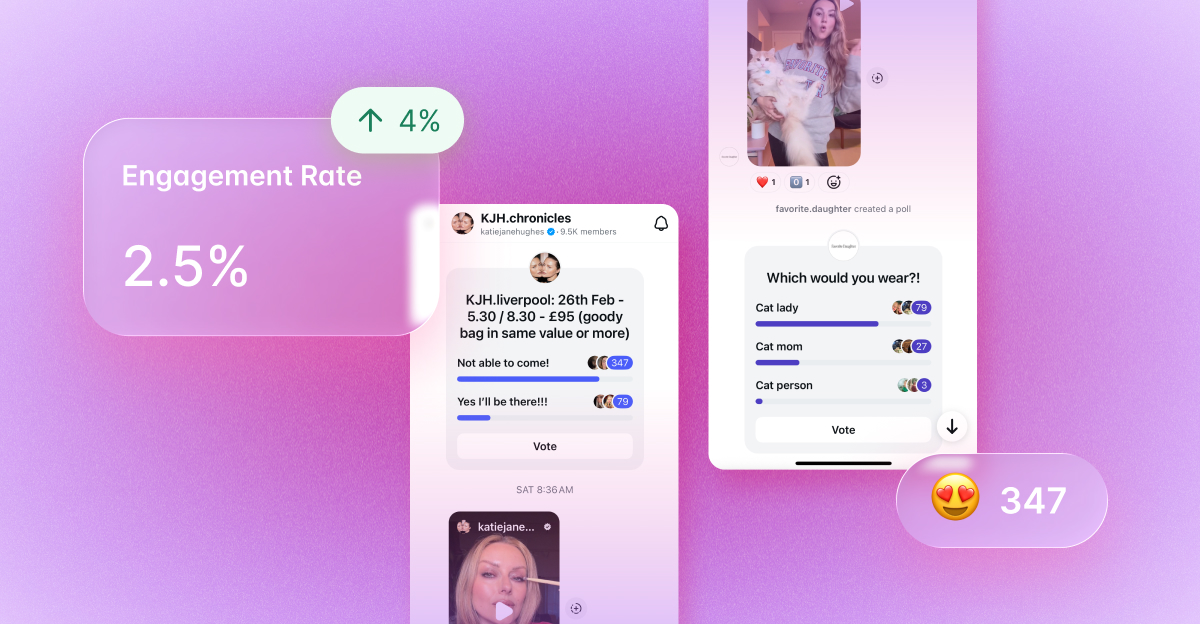
Makeup artist Katie Jane Hughes uses Instagram Broadcast Channel (KJH.chronicles), to share updates, makeup looks, giveaways, voice notes and interactive elements like polls. With polls and questions, Hughes is able to collect follower feedback on things like whether or not followers would like a tutorial for specific makeup looks and what kind of makeup looks they’re most interested in. This is a great complement to any data your team is collecting through audience demographics or Social Listening tools, so you can truly gauge what your audience wants to see.

Why Create an Instagram Broadcast Channel?
While Instagram Stories, especially the ‘Close Friends’ feature, are great for engaging followers, they rely on Instagram’s algorithm to determine visibility. This means your content isn’t always guaranteed to reach everyone. Broadcast Channels, on the other hand, offer a direct line to your audience, ensuring that your messages land in their inbox without competing with other content.
Here’s why brands and creators should leverage Broadcast Channels:
- Guaranteed Delivery – Unlike Stories, which are subject to algorithmic placement, Broadcast Channels send messages straight to your subscribers' inboxes, increasing visibility. Brands also gain access to engagement insights, helping them track opens, reactions and interaction patterns to better understand what content resonates most with their most engaged followers.
- Less Time & Effort – No need for social media SEO optimization, curated visuals, or complex editing. Broadcast Channels make it easy to share quick updates, behind-the-scenes insights, and exclusive content.
- Stronger Community Engagement – Because followers must opt-in, your audience is already interested and engaged, making it an effective tool for building stronger connections.
Instagram Broadcast Channel Tips
Broadcast Channels are a great way to drive engagement and are a great addition to any community-based marketing tactics. But how exactly can you use channels to share content that drives revenue and pique your audience’s interest? Here are a few tips to use this Instagram feature to your advantage.
Create Exclusivity
Although anyone can subscribe to your Broadcast Channels, it creates an exclusive feel where users feel they’re being spoken to directly. Wouldn’t you want a DM from your favorite brand? Creators can also create Broadcast Channels within a Broadcast Channel, speaking to a specific segment of users. Another aspect of exclusivity comes in the form of good ol’ discount codes and sale notifications. Brands can alert subscribers to sales, restocks, new product releases and more before they happen, which is a great tactic to incorporate into your e-commerce marketing strategy.
Nurture Partnerships
Another way brands could use Instagram Broadcast Channels is to create a segment specifically for UGC creators or influencers. Brands can send exclusive messages, updates and sneak peeks of products to create a simple, direct line of communication to share information with these valued members of their network.
Build Community
Broadcast Channels can also be a great way to build a social media community. Since subscribers come to you, this is a great sign that they’re already engaged. Now that you have their attention, you can speak to them directly with a notification you know they’ll see. Since you’ll likely be sharing discount codes, tips and more, you can also use interactive tools like polls, Prompts and optional reply threads to spark structured conversations and gather feedback directly from your most engaged subscribers. You can also share a link to your Broadcast Channel with a sticker in your Stories, to continue growing your community.
Enhance Authenticity
Broadcast Channels almost feel like chatting with a friend, making them a great tactic to increase your brand’s authenticity. Use Broadcast Channels to hone your voice and show your brand’s personality to your audience. According to Instagram’s Trend Talk report, sending Reels or trending memes via Instagram DMs was Gen Z’s preferred way to use Instagram to get closer to others. Brands can tap into this by sharing funny quips, Reels and other content their audience wants to see.
Leverage Prompts for Deeper Interaction
Prompts allow brands to ask time-sensitive, interactive questions within their channel, encouraging participation without opening up a full DM thread. Use them for product feedback, early access signups or quick pulse checks before a launch.
Turn Instagram Insights Into Action With Dash Social
Brands can use Dash Social to enhance their Instagram strategy by leveraging its AI-driven tools for comprehensive insights and competitive analysis. Instagram Insights helps brands understand their audience's preferences and behaviors, enabling them to tailor content for maximum engagement.
Competitive Insights and Benchmarking allow brands to compare their performance against competitors, identifying strengths and areas for improvement. While Campaigns track the effectiveness of various campaigns, offering real-time data to optimize future marketing efforts.
By incorporating these features into your workflow, brands can make data-driven decisions to boost their Instagram presence and drive better results.

Instagram Broadcast Channels FAQs
How do you turn off all Broadcast Channel notifications on Instagram?
To turn off all Broadcast Channel notifications on Instagram, go to your profile and tap the three horizontal lines in the top right corner. Select ‘Settings,’ then ‘Notifications,’ and choose ‘Broadcast Channels.’ From there, you can toggle off notifications for all Broadcast Channels.
Why can’t I create a Broadcast Channel on Instagram?
If you don’t see the option to create a Broadcast Channel, it’s usually due to eligibility or rollout limitations. You must have a Professional account (Creator or Business) and be in good account standing. Instagram also rolls out features gradually by region and account type, so access may not be available yet.
Make sure your app is updated to the latest version, and check your inbox (where Channels are created) for access.