What Is YouTube Creator Studio and How Can It Grow Your Channel?
Master YouTube Studio to manage content, track performance, and grow your brand’s channel with ease.
Get a complete view of your channel performance with Dash Social’s YouTube Insights. Video-first analytics built to optimize reporting, content strategy, and growth.
Contents
What Is YouTube Studio?How Can YouTube Studio Benefit My Brand Channel?How YouTube Shorts Fit Into Your Channel Growth StrategyHow To Use YouTube StudioCommunity Building Goes Beyond CommentsAccessibility and Global Reach Matter More Than EverDash Social's YouTube Insights YouTube Creator Studio FAQs
Thanks to its unique origin story, YouTube remains one of the most fascinating social media platforms. What began as a failed online dating site in 2005 quickly evolved into the world’s leading destination for watching and sharing video content. In an iconic moment, the platform’s founders explained the pivot with a simple philosophy: “Why not let the users define what YouTube is all about?”
That user-first mindset has fueled YouTube’s growth to over 2.5 billion monthly active users and laid the foundation for an ecosystem where creators and brands can thrive. Today, as entertainment dominates user demand, YouTube is in constant competition with platforms like TikTok and Instagram for attention, while creators remain the driving force behind the content audiences want to watch.
YouTube’s role in the creator economy is stronger than ever. With the continued rise of YouTube Shorts, expanded monetization opportunities, and more advanced creator tools, the platform has become one of the most effective places for brands to build long-term visibility through both short-form discovery and evergreen video content. For marketers, YouTube is more than just a video platform, it’s a search engine, community hub, and growth channel all in one.
Key Takeaways
- YouTube Studio is the central hub for managing content, community, and channel performance.
- Brands can use tools like Dashboard, Content, and Analytics to optimize video strategy and engagement.
- Features like Subtitles and Language help build stronger communities and expand global reach.
- YouTube Analytics provides valuable insights into viewers, watch time, and content discovery trends.
- Dash Social’s YouTube Insights takes reporting further with customizable, holistic video-first performance analysis.
What Is YouTube Studio?
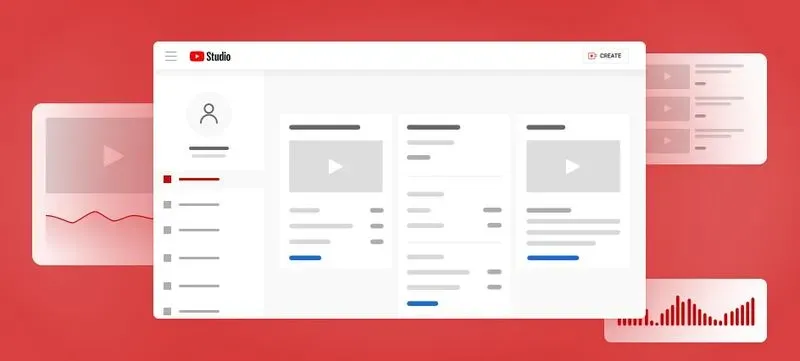
YouTube Studio (also called YouTube Creator Studio) is the main control center for creators and brands managing their YouTube marketing efforts. It’s where you manage your channel, publish and optimize videos, monitor performance, engage with your community, and track key metrics like views, retention, and subscriber growth.
As video-first strategies expand across both long-form content and Shorts, YouTube Studio has become an essential tool for understanding what works, improving discoverability, and growing your channel with intention.

How Can YouTube Studio Benefit My Brand Channel?
Investing time in YouTube Studio helps brands create content more effectively and build stronger audience engagement. Small but meaningful tools within the platform can have a major impact on channel performance when used strategically.
The Community section, for example, gives brands a dedicated space to monitor and respond to comments in real time, without needing to scroll through every individual video. With filters for unanswered questions, reviewed comments, and pending replies, brands can stay organized and foster more active, two-way conversations that strengthen loyalty and engagement.
Subtitles and captions are other valuable features with in the platform, allowing brands to make content more accessible and reach audiences across languages and regions. By adding multilingual captions, you invite more viewers into your community and improve discoverability.
YouTube Studio also offers Customization tools that help brands shape their channel layout and homepage to create a strong first impression for new visitors. Together, these features make YouTube Studio an essential resource for brands looking to grow with intention on the platform.
How YouTube Shorts Fit Into Your Channel Growth Strategy
Short-form video is now one of the strongest drivers of discovery on YouTube, and YouTube Shorts play a central role in helping brands reach new audiences beyond their subscriber base. Shorts often serve as the first touchpoint for viewers, introducing them to your channel through recommendation feeds.
YouTube Studio makes it easy to manage this strategy by letting brands track Shorts performance alongside long-form content. With dedicated insights, you can see how Shorts contribute to subscriber growth, identify which videos funnel viewers into longer content, and optimize your publishing cadence based on retention and engagement trends.
For brands focused on growth, Shorts spark awareness while long-form videos build deeper trust, storytelling, and long-term community.
How To Use YouTube Studio
After more than two decades as a video-first platform, YouTube has continually refined the creator experience, cementing its role as a cornerstone of the creator economy. One of the biggest strengths of YouTube Creator Studio is how simple and intuitive it is. Giving brands everything they need to manage content, track performance, and grow with purpose. Below are a few of the most important tools to know as you get started.
YouTube Dashboard
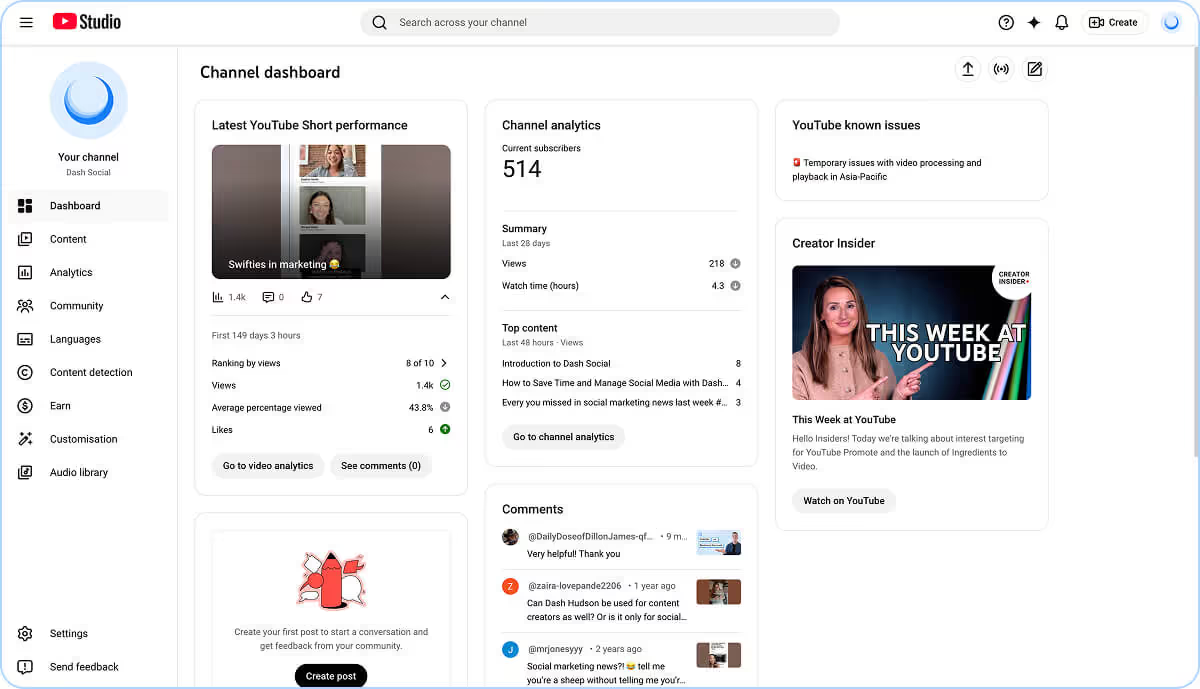
When you log into YouTube Studio, the Dashboard is your first stop. It provides a high-level snapshot of channel performance, including recent views and comments, subscriber growth, and content updates. It also highlights Creator Insider news, platform changes, and tips to help you stay informed on new features and best practices.
Content Hub
The Content tab gives you a complete view of every video you’ve published, all in one place. Each upload includes key details like visibility settings, restrictions, publish date, views, and engagement.
You can also filter content by factors like copyright claims, audience settings, or performance metrics to quickly find what you need. While full video editing happens outside of Studio, this is where you optimize titles, thumbnails, descriptions, and tags. All critical elements for improving discoverability and click-through rates.
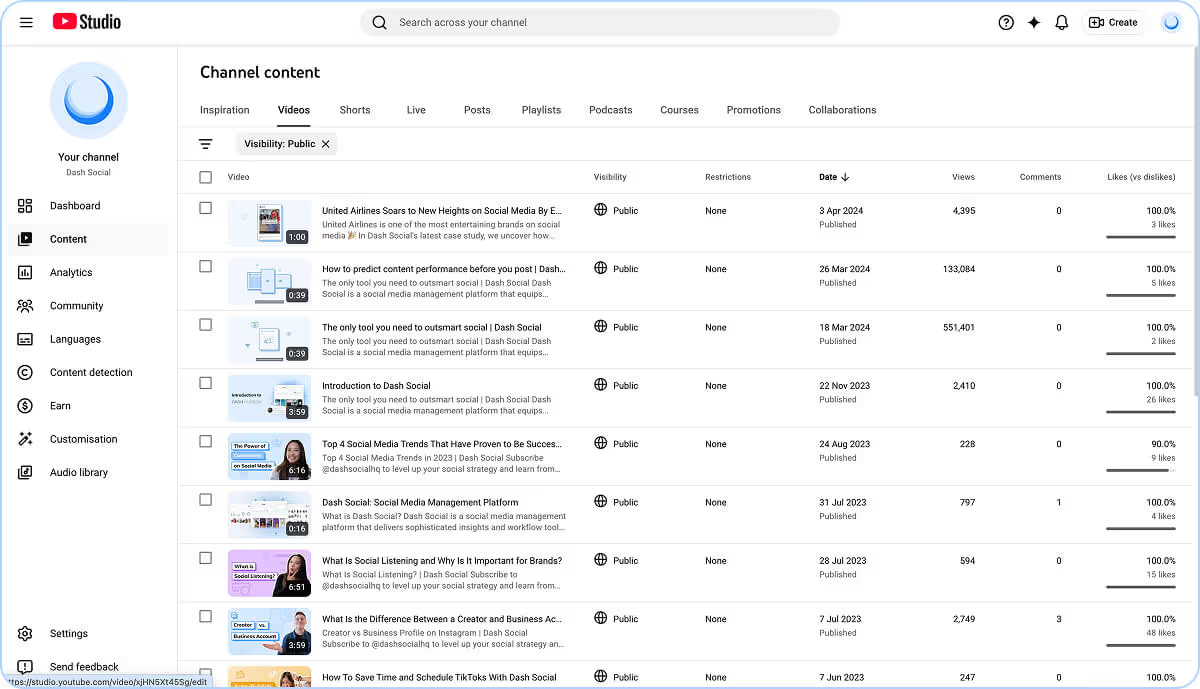
Although the actual editing of your content will take place outside of YouTube Studio, there are still some editing features available within the Content Tab’s editing feature. Using this tool, you will prepare your videos for posting by editing their titles, descriptions, thumbnails, tags, and more. This step is crucial, so do not skip it and ensure that the tags you add are relevant to the content you are creating, as it will help users find you and your videos. Creating a good title and thumbnail can really set your content apart from the rest. Ensure they are eye-catching, engaging, and honest, so users will know what to expect when they click on your video. And finally, a great description is concise and gives the users any additional information or links they may need regarding the content you have created.
Analytics Hub
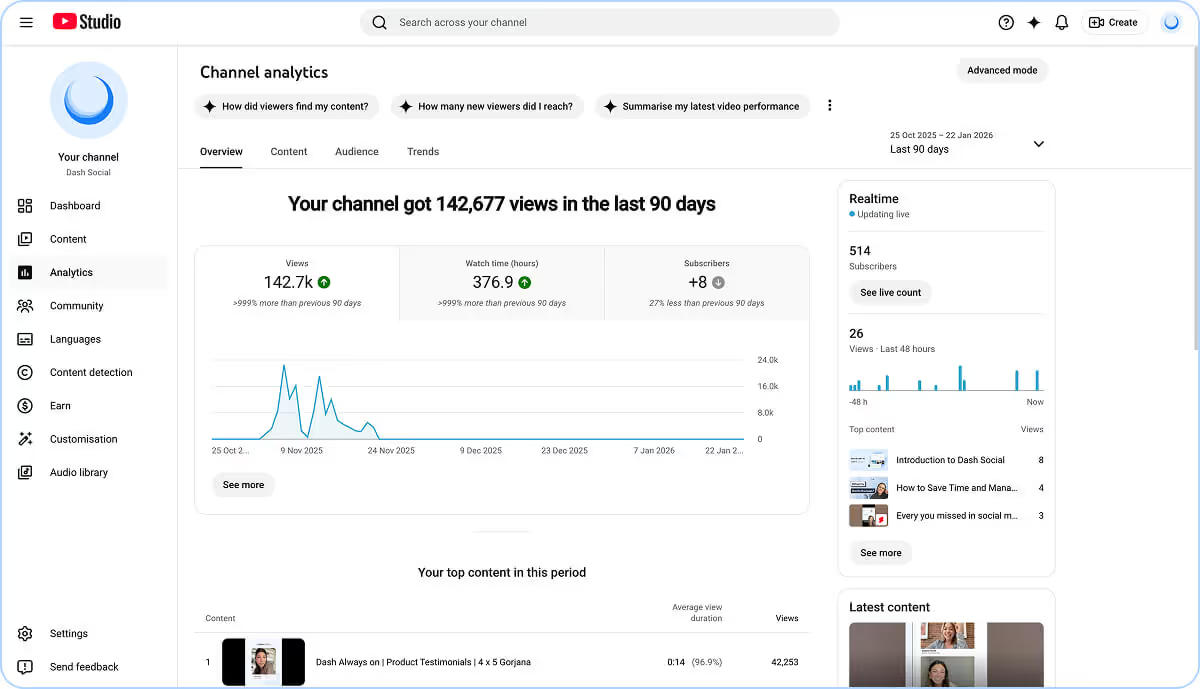
Once your content is live, the YouTube Analytics tab is where you evaluate what’s working. Brands can monitor core KPIs like watch time, views, and subscriber growth in real time, while also digging deeper into audience behavior.
YouTube Studio now offers advanced insights into audience retention, discovery pathways, and viewing patterns across formats. Brands can see whether viewers found content through Search, Shorts feeds, Browse, or Suggested Videos. This helps refine what drives reach and repeat engagement. The Research tools also make it easier to spot trends and uncover new video ideas based on what audiences are actively searching for.
Additional YouTube Studio Tools
Beyond Dashboard, Content, and Analytics, YouTube Studio includes a wide range of tools that support channel growth. Features like Community, Subtitles, Languages, Content detection, Audio Library, and Earn help brands manage engagement, improve accessibility, and track monetization opportunities.
With expanded Partner Program entry points, including Shorts-based thresholds and fan-supported features like memberships, monetization on YouTube is no longer one-size-fits-all. YouTube Studio is where creators and brands go to manage it all in one place.
Community Building Goes Beyond Comments
While comments remain a key engagement lever, YouTube’s community-building features have expanded significantly in recent years. Today, brands can deepen audience relationships through a wider range of tools designed to foster connection beyond the video itself.
Within YouTube Studio, brands can publish Community Posts like polls, images, and announcements, host live streams with real-time chat and moderation, and offer channel memberships or subscriber perks that reward loyal viewers. These interactive touchpoints create valuable feedback loops, helping brands understand what audiences want while building stronger, more consistent engagement.
YouTube Studio brings all of these community tools into one centralized place, making it easier to nurture loyalty, spark conversation, and turn casual viewers into long-term subscribers.
Accessibility and Global Reach Matter More Than Ever
Accessibility is now a baseline expectation for video content, not an optional extra. YouTube Studio makes it easier for brands to create more inclusive viewing experiences through built-in subtitles and language tools.
With features like closed captions, multi-language subtitles, and translation support, brands can reach broader audiences across regions and ensure content is accessible to viewers with different needs. Prioritizing accessibility doesn’t just improve engagement, it can also strengthen discoverability, since captions and metadata give YouTube’s algorithm more context to better surface your videos to the right audiences.

Dash Social's YouTube Insights
YouTube Studio provides powerful native tools, but many brands still struggle to connect performance metrics to broader strategy. Knowing what happened is only half the equation. Understanding what to do next is where deeper insights become essential. Dash Social's YouTube Insights has the answers.
These customizable insights tailored specifically to YouTube remove the guesswork that can come with social reporting by showing brands exactly what their analytics mean and allowing them to organize this data in a way that makes sense to them. Marketers can choose exactly how they want to interpret and present their social media analytics, generally, granularly or both.
Beyond metrics and insights, Dash Social will help with competitive insights and benchmarking, scheduling videos, segmenting, and surfacing top-performing content, and managing your valuable community on YouTube. By using YouTube Studio’s analytics in tandem with Dash Social, brands are guaranteed to see success in growing their channel.
YouTube Creator Studio FAQs
How do you access YouTube Studio?
YouTube Studio can be accessed directly from the YouTube homepage in a few different ways. On desktop, click the menu on the left-hand side, scroll to More From YouTube, and select YouTube Studio. You can also click your profile icon in the top-right corner and choose YouTube Studio from the dropdown menu. The same option is available on mobile through the YouTube app, making it easy to manage your channel from anywhere.
Is YouTube Creator Studio free?
Yes, YouTube Creator Studio is completely free to use with any YouTube channel. However, some monetization features and partner programs may have eligibility requirements.
How do I enable Creator Studio?
To access Creator Studio, you must have a YouTube channel. If you’re signed into YouTube with a Google account but haven’t created a channel yet, YouTube will prompt you to set one up when you try to access Studio. Once your channel is created, you can open YouTube Studio anytime through the menu or your profile dropdown, and Creator Studio will automatically be available.
Can I edit videos in YouTube Studio?
YouTube Studio doesn’t support full video editing, but it does allow for basic adjustments. To edit a video, sign into YouTube Studio and select Content from the left-hand menu. Click the title or thumbnail of the video you want to update, then choose Editor. From there, you can make minor edits like trimming, cutting sections, or adjusting certain elements before saving your changes.