10 Best Social Media Collaboration Tools for Teams and Approval Workflows
Streamline approvals, align teams, and publish faster with the right social media collaboration tools.
Contents
What Are Social Media Collaboration Tools?What To Look For in the Best Social Media Collaboration ToolsBest Social Media Tools for Team Collaboration and Approval WorkflowsHow To Choose the Right Social Media Collaboration Software for Your TeamWhy Approval Workflows Matter More As Teams ScaleSocial Media Collaboration Tools FAQs
For most teams, the hardest part of social media is getting content approved and out the door.
Ever feel like publishing a single social post requires five tools, three approvals, and a dozen back-and-forth messages? When content is drafted in one place, assets live in another, reporting sits in spreadsheets, and approvals happen across Slack or email, delays quickly become the norm.
Social media workflows often fail when they are spread across too many tools. Without a clear system for collaboration and approvals, work becomes fragmented, momentum stalls, and quality becomes harder to maintain.
This is why teams need a strong social media collaboration tool that centralizes content planning, drafting, feedback, approvals, reporting, and scheduling. By bringing everything into one platform, teams gain the visibility and control needed to operate efficiently at scale.
This guide explores the best social media collaboration tools and outlines what teams should consider when selecting the right solution.
Key Takeaways:
- Social media collaboration tools bring planning, approvals, publishing, and reporting into one workspace, helping teams manage content more efficiently.
- Unlike basic schedulers, collaboration software supports the full workflow, from feedback and version control to multi-stakeholder approvals.
- As teams scale, fragmented tools and manual processes create bottlenecks. Structured workflows help maintain speed and consistency.
- The best platforms reduce manual work, centralize communication, improve visibility, and connect content performance to ROI.
- Enterprise and high-volume teams should prioritize permissions, approval workflows, shared calendars, and performance insights to collaborate at scale.
What Are Social Media Collaboration Tools?
Social media collaboration tools are platforms designed to help teams plan, publish, review, schedule, approve, and report on social content across multiple channels, all in one place. Sounds a lot like a scheduling tool, right? Not quite.
The difference really comes down to how much coordination is involved. A scheduler helps teams publish content, but a social media collaboration tool supports the entire end-to-end workflow across planning, creation, publishing, and reporting. Great collaboration tools enable multiple stakeholders to collaborate seamlessly, with drafts, creative assets, feedback, and approvals all centralized in one workspace.

What To Look For in the Best Social Media Collaboration Tools
The best enterprise social collaboration software should do more than help teams schedule posts. It should give every stakeholder a clear, connected way to plan, review, approve, publish, and measure content without slowing the team down.
Use this checklist to evaluate your options.
Centralized content planning
Look for a shared content calendar that gives every team visibility into what’s planned, what’s in review, and what’s going live. This helps reduce duplicated work, missed deadlines, and last-minute confusion.
Built-in approval workflows
Your platform should support structured approval paths, so feedback, edits, and sign-offs happen in one place. This is especially important for enterprise teams managing multiple brands, markets, or stakeholders.
Role-based permissions
Enterprise teams need control over who can create, edit, approve, and publish content. Role-based permissions help protect brand consistency while giving the right people access to the right workflows.
Easy feedback and version control
The right tool should make it simple to leave comments, track edits, and manage content versions without relying on scattered docs, messages, or spreadsheets.
Multi-channel publishing
Strong collaboration tools should connect planning and publishing across your key social channels, so teams can move from strategy to execution without switching platforms.
Performance insights
Collaboration should connect back to results. Look for reporting that helps your team understand what content is working, where to optimize, and how social performance ties back to broader business goals.
Scalability for growing teams
As your team grows, your workflows need to hold up. Prioritize platforms built for high-volume publishing, multi-team collaboration, and consistent governance across brands, regions, and campaigns.
Best Social Media Tools for Team Collaboration and Approval Workflows
The best social media collaboration tool depends on team structure, approval complexity, and how content is managed from planning to reporting. Some platforms are built for fast content review, while others are designed for more complex enterprise approvals, feedback, analytics, or creator workflows.
Use this comparison to evaluate each tool by workflow fit, approval depth, ease of use, and how well it keeps teams aligned from planning to performance.
Dash Social
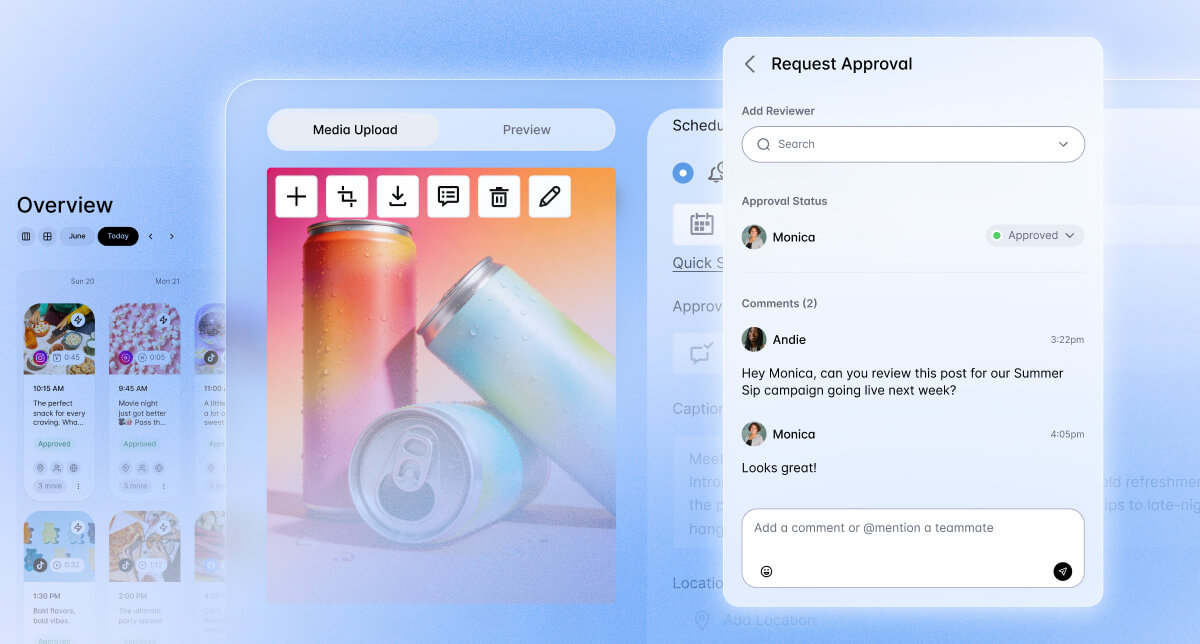
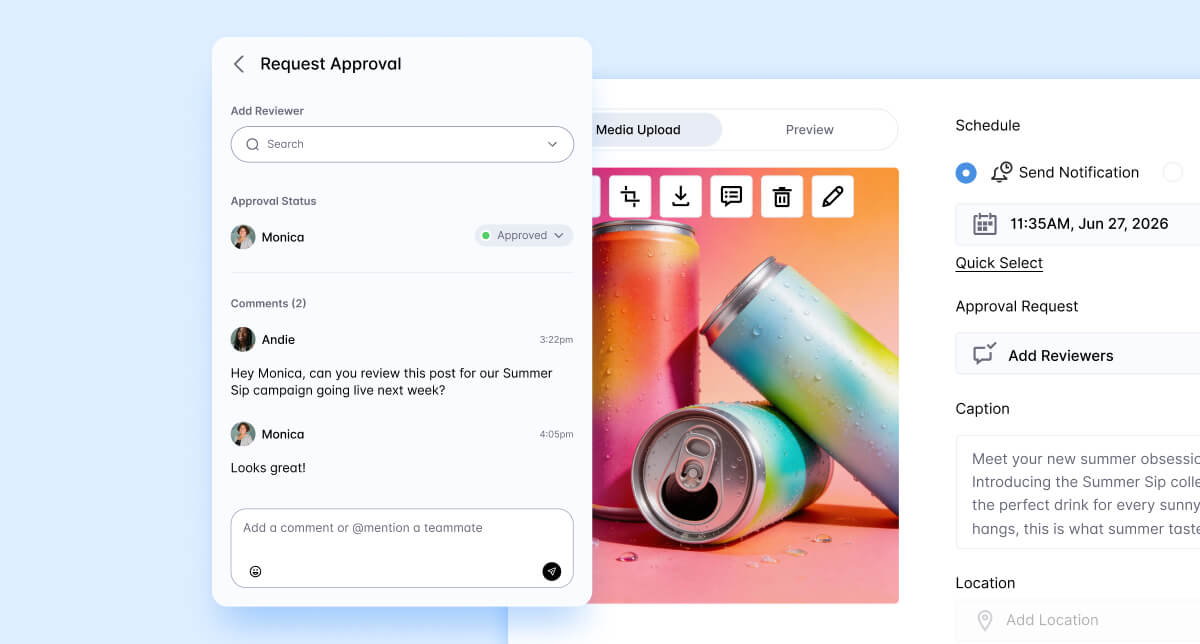
Dash Social is a social media management platform built for teams that want to tie organic, paid, and creator content performance directly to ROI. It brings together planning, approval workflows, publishing, reporting, and creator management in one platform, helping teams streamline workflows and connect social efforts to measurable results.
Best fit
Dash is the strongest option for mid-sized to enterprise brands managing multiple brands, regions, or channels.
Key strengths
Dash Social brings the most important collaboration tools together in one platform. Its biggest strength is connecting workflow to performance, so teams can see what was approved, what went live, and what drove measurable impact.
Collaboration and approvals features
Built for integrated team workflows, Dash Social supports easy collaboration with unlimited seats, supporting broader team collaboration and making it easier to get projects and approvals over the finish line.
Pricing
Plans start at $999 per month. Creator Management, Premium Analytics, and Social Listening are available as add-ons.
Limitations
Less ideal for very small teams that only need a lightweight scheduler.
Sprout Social
Sprout Social is a social media management platform built for teams that prioritize analytics, social listening, and customer engagement. It combines publishing, reporting, and a unified inbox into one system, with a focus on data and audience insights.
Best fit
Mid-sized to enterprise teams that prioritize analytics, social listening, publishing governance, and customer engagement.
Key strengths
Strong analytics, social listening, inbox management, and reporting. Sprout is a good fit for teams that need a mature platform with structured permissions and cross-functional visibility.
Collaboration and approvals features
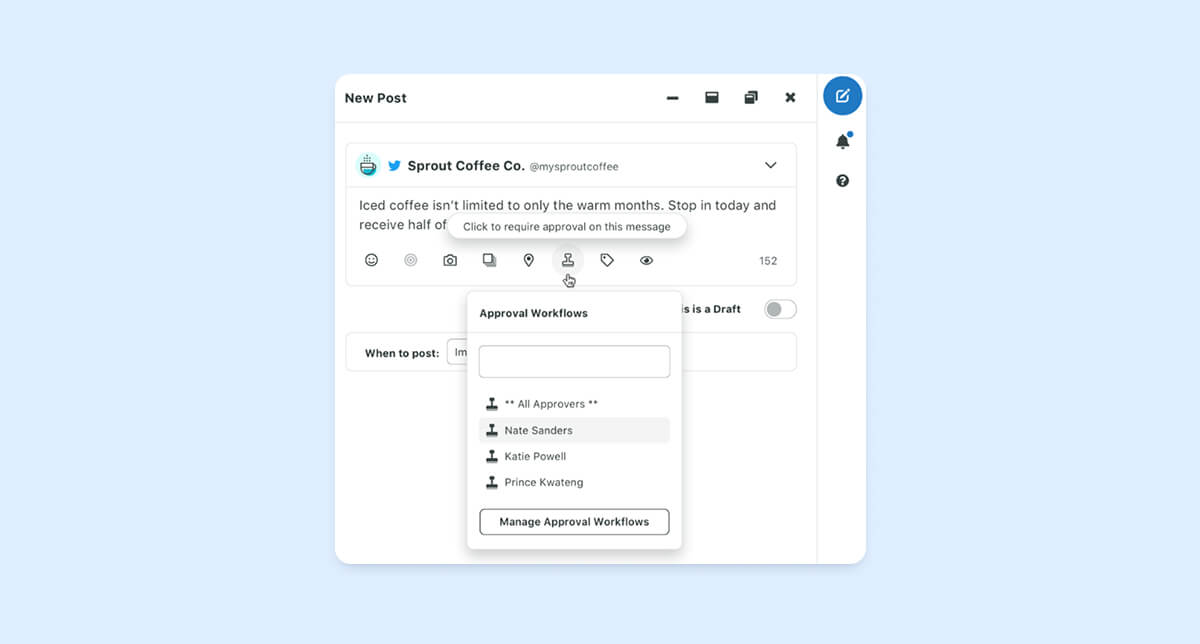
Sprout supports multi-step and multi-user approval workflows, external approvers, reply approvals, and role-based permissions. Message approval workflows are available on Professional and Advanced plans.
Pricing
Essentials starts at $79 per seat/month with annual billing. Standard is $199 per seat/month, Professional is $299, Advanced is $399, and Enterprise is custom.
Limitations
Per-seat pricing can get expensive as teams grow. Some advanced analytics and listening capabilities require add-ons or higher-tier plans.
Compare Sprout Social vs. Dash Social
Hootsuite
Hootsuite is a social media management tool that enables teams to unify scheduling, content creation, analytics, and social listening into one platform.
Best fit
Best for Mid-sized to enterprise teams with multiple contributors, approvers, and social profiles that need formal publishing controls.
Key strengths
Broad scheduling, analytics, listening, and governance features. Hootsuite is built for teams that need a familiar platform with stronger permissions and approval controls.
Collaboration and approvals features
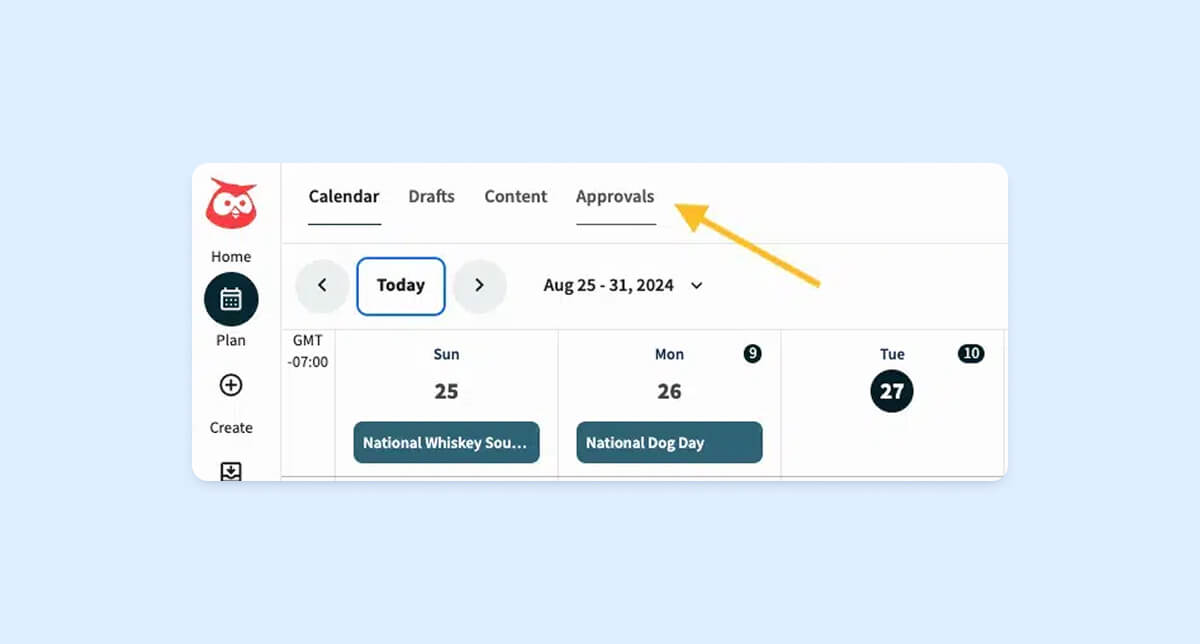
Hootsuite offers flexible approval features, including custom workflows, multi-step approval sequences, one-off approvers, notifications, and external approval records. These workflows are available on Advanced, Business, and Enterprise plans.
Pricing
Hootsuite offers Standard, Advanced, and Enterprise plans. Public pricing varies by source and region, so pricing should be verified directly before publishing.
Limitations
Stronger approval tools are tied to higher-tier plans. Smaller teams may find the platform heavier than they need.
Compare Hootsuite vs. Dash Social
Buffer
Buffer is a simple social media management platform designed to help teams schedule, publish, analyze posts, and streamline content planning across multiple platforms from one dashboard.
Best fit
Small businesses and creators that need simple scheduling and publishing features with light collaboration. Best for solo marketers and small teams that want a clean, affordable tool without a complex approval setup.
Key strengths
Buffer is easy to use, affordable, and quick to adopt. It’s a strong option for teams that want a simple way to plan and publish content without a steep learning curve.
Collaboration and approvals features
Buffer’s Team plan includes unlimited team members, access levels, and content approval workflows.
Pricing
Free plan available. Essentials starts at $5 per channel/month, and Team starts at $10 per channel/month.
Limitations
Not built for complex approval chains, enterprise governance, deep listening, or advanced reporting.
Planable
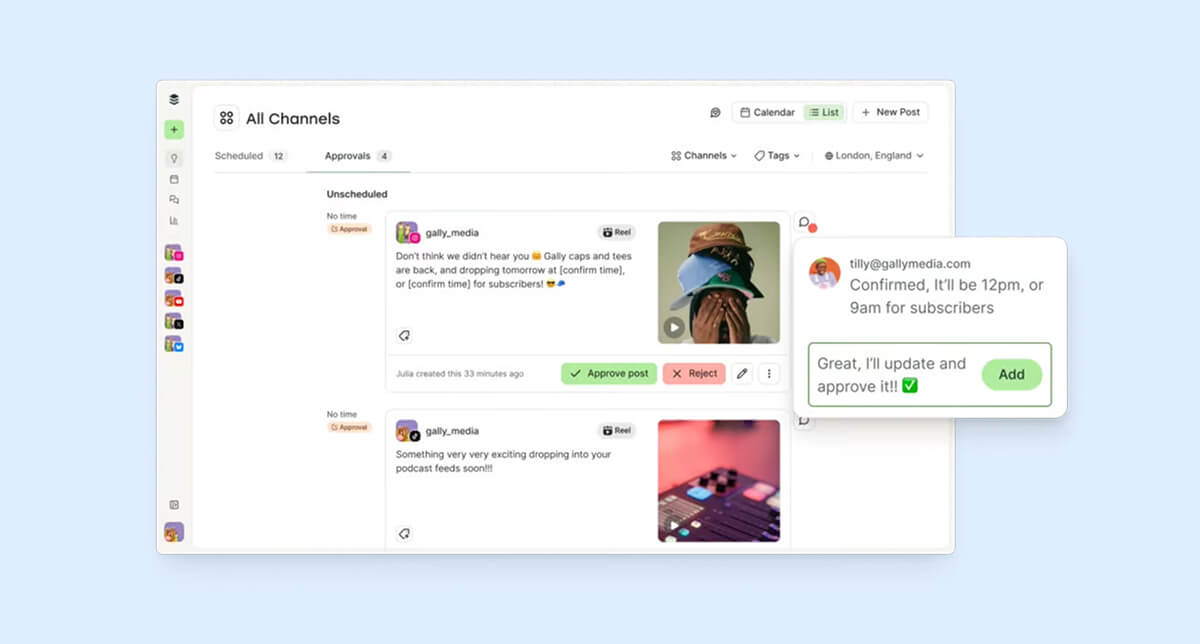
Planable is a collaborative social media management tool built for teams to centralize planning, reviewing, and scheduling content into a unified platform.
Best fit
Best for agencies, client-facing teams, and approval-heavy social teams that spend a lot of time collecting feedback, managing revisions, and securing approvals from clients or internal stakeholders.
Key strengths
Planable is built for collaboration and approvals. Drafts, comments, suggested edits, and approvals all live in one workflow, so teams can easily track what changed and what’s been approved.
Collaboration and approvals features
Planable supports optional approvals, one-click approvals, client approvals, approval history, and automatic scheduling once content is approved. Multi-level approvals are available on Enterprise.
Pricing
Free plan available. Basic is $33 per workspace/month, Pro is $49 per workspace/month, and Enterprise is custom.
Limitations
Less ideal for teams that need deep analytics, social listening, inbox management, or ROI reporting in the same platform.
SocialPilot
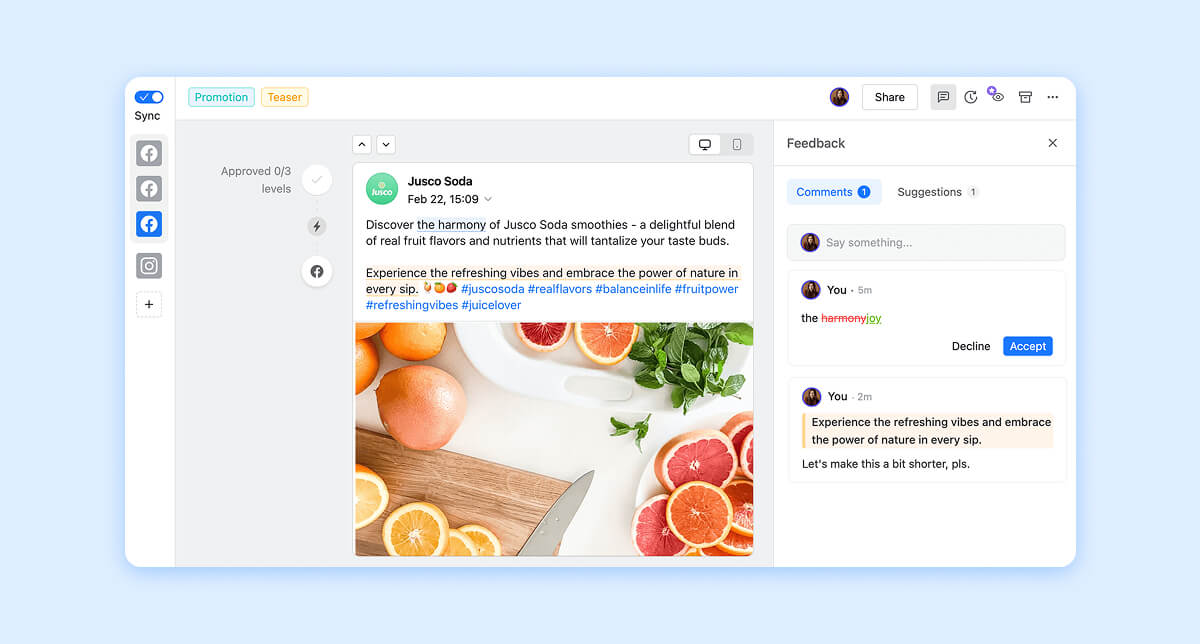
SocialPilot is a social media scheduling and management tool designed to support businesses, marketers, and agencies plan, schedule, publish, engage with their audience, and analyze content from one single workplace.
Best fit
Best for budget-conscious SMBs, agencies, and growing teams that need affordable scheduling, collaboration, and client approvals without enterprise pricing.
Key strengths
Strong value for the price. SocialPilot gives teams practical publishing, collaboration, analytics, and client approval features at a lower entry cost than many enterprise tools.
Collaboration and approvals features
Standard includes team collaboration and manager approval. Premium includes client approval, and Ultimate includes unlimited users.
Pricing
Essentials is $20 per month, Standard is $40, Premium is $100, Ultimate is $200, and Enterprise is custom. You can save 15% on each plan if you opt into annual billing.
Limitations
Less ideal for teams that need advanced enterprise analytics, complex listening, or deeper governance across large global teams.
Loomly
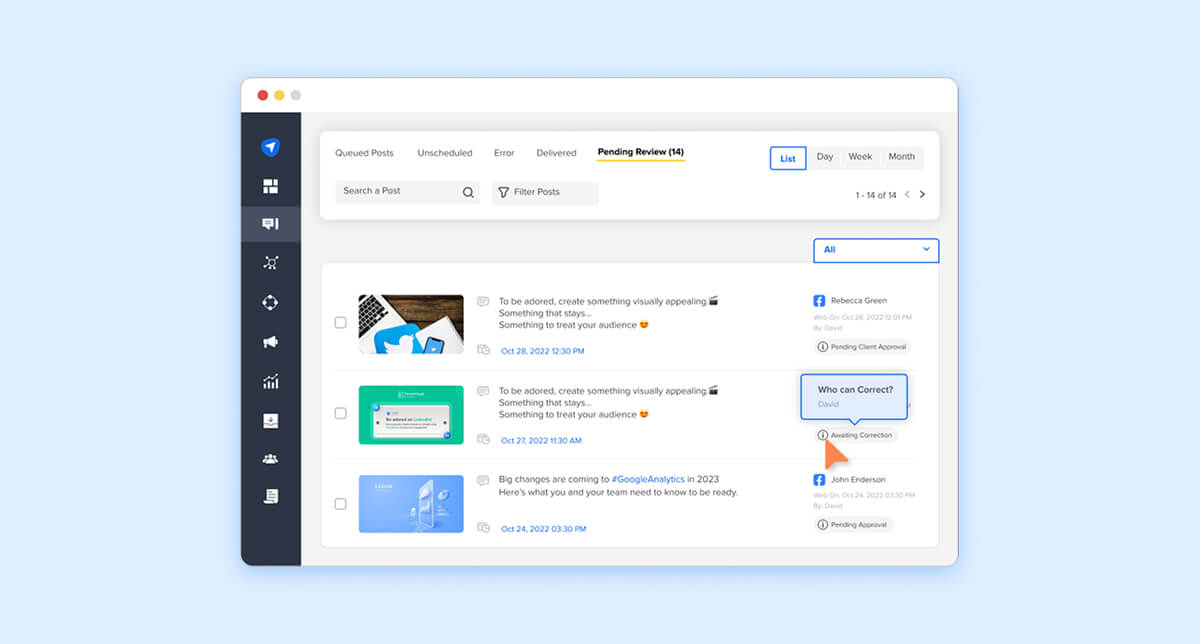
Loomly is a lightweight social media management tool that helps teams plan, create, schedule, and publish content across platforms. It includes content calendars, post previews, and approval workflows, making it easier for teams to collaborate.
Best fit
Best for small to mid-sized in-house teams and agencies that need clear planning, review, and scheduling without a heavy enterprise setup.
Key strengths
Loomly is a good fit for teams that want structure without complexity. Easy planning, visual calendars, simple collaboration, and approachable approvals.
Collaboration and approvals features
Supports custom permissions, roles, approval workflows, real-time commenting, private internal comments, Slack notifications, Microsoft Teams notifications, and review notifications for individual posts or full calendars.
Pricing
Starter is $49 per month, billed annually; Beyond is $249 per month, billed annually, and Enterprise is custom.
Limitations
Less ideal for teams that need advanced listening, enterprise reporting, or full creator management.
Sendible
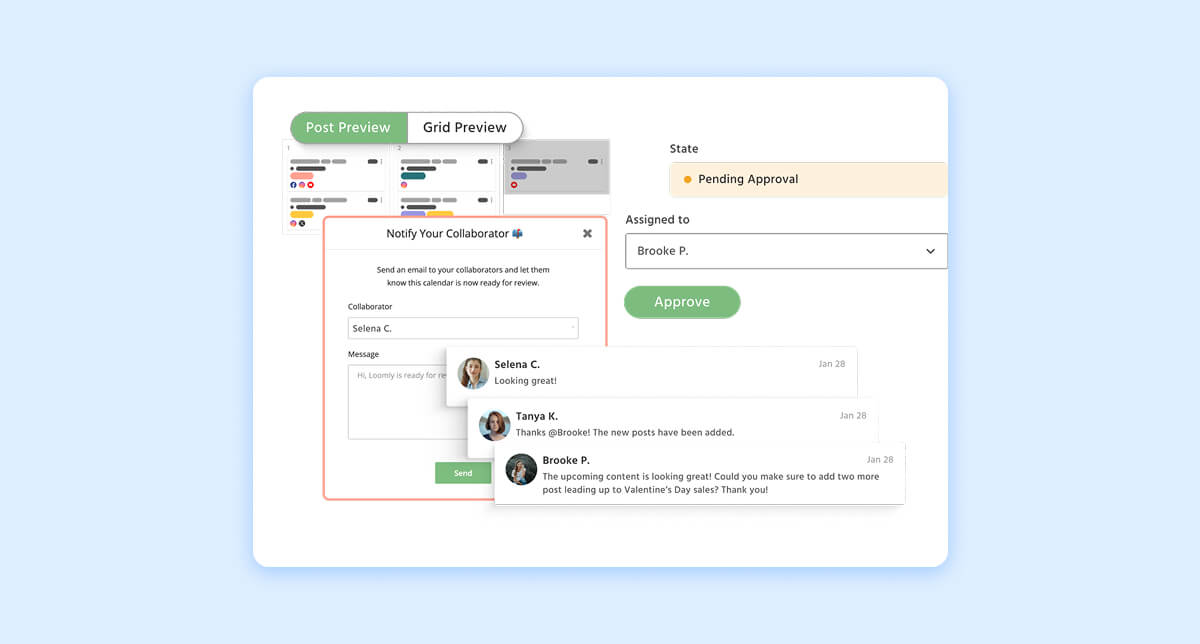
Sendible is a social media management platform developed for agencies and marketing teams to centralize the management of multiple social media profiles, allowing them to plan, schedule, publish, analyze, and report content all in one place.
Best fit
Best for freelancers and agencies that need client dashboards, approval tasks, and account-specific access controls.
Key strengths
Sendible is built with agencies in mind. It helps teams manage multiple clients, assign work, send content for approval, and keep feedback organized.
Collaboration and approvals features
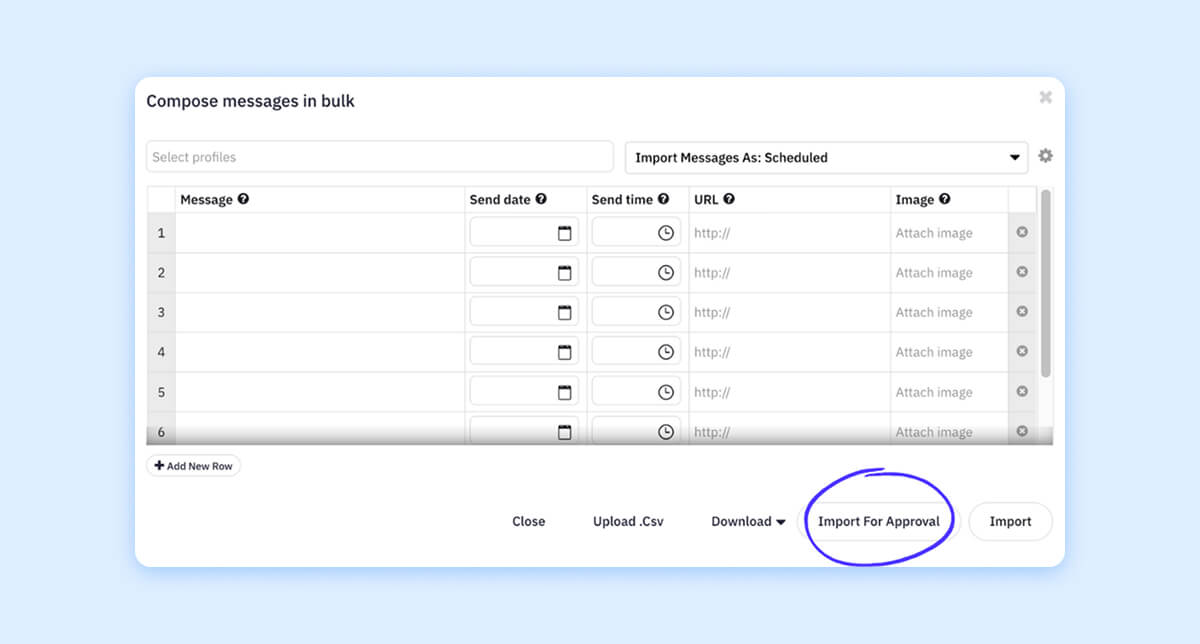
Supports approval tasks, client approvals, comments, email notifications, bulk approval requests, and team assignments.
Pricing
Free trial and demos available. Pricing ranges from $29 per month for Creator, up to $750 per month for Enterprise.
Limitations
Some approval features depend on the plan level. Teams that need deeper native analytics, listening, or enterprise-grade workflow may need a more robust platform.
Iconosquare
Iconsquare is an all-in-one social media management tool for brands and agencies that combines scheduling and publishing tools with in-depth analytics. It also supports team collaboration, allowing multiple users to manage accounts together, review content, and track performance across multiple channels.
Best fit
Analytics-first teams that also need scheduling and light collaboration. Best for brands and agencies that want strong reporting, competitive visibility, and simple approval workflows.
Key strengths
Strong analytics, reporting, dashboards, benchmarking, and publishing.
Collaboration and approvals features
Supports approval workflows, external sharing links, review notes, shared calendars, real-time collaboration, and role-based access.
Pricing
Free plan available after trial. Paid plans include Launch, Scale, Excel, and Custom. Pricing varies by region, currency, users, and social profiles.
Limitations
Less ideal for teams that need deep enterprise approval chains, creator management, or full social workflow consolidation.
Agorapulse
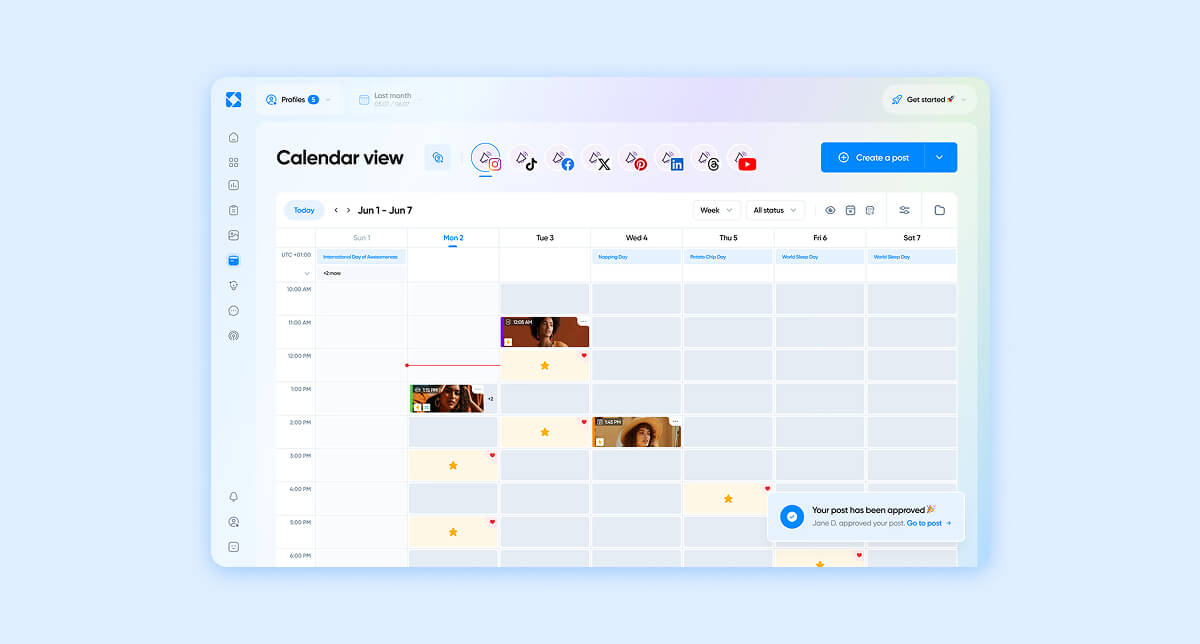
Agorapulse is a social media management software that helps businesses and agencies to schedule posts, manage audience messages and comments, track performance across multiple channels, and generate reports from a single dashboard.
Best fit
Growing teams that need publishing, inbox management, assignments, approvals, and reporting in one platform.
Key strengths
Strong inbox management, publishing, team assignments, reporting, and ROI analysis.
Collaboration and approvals features
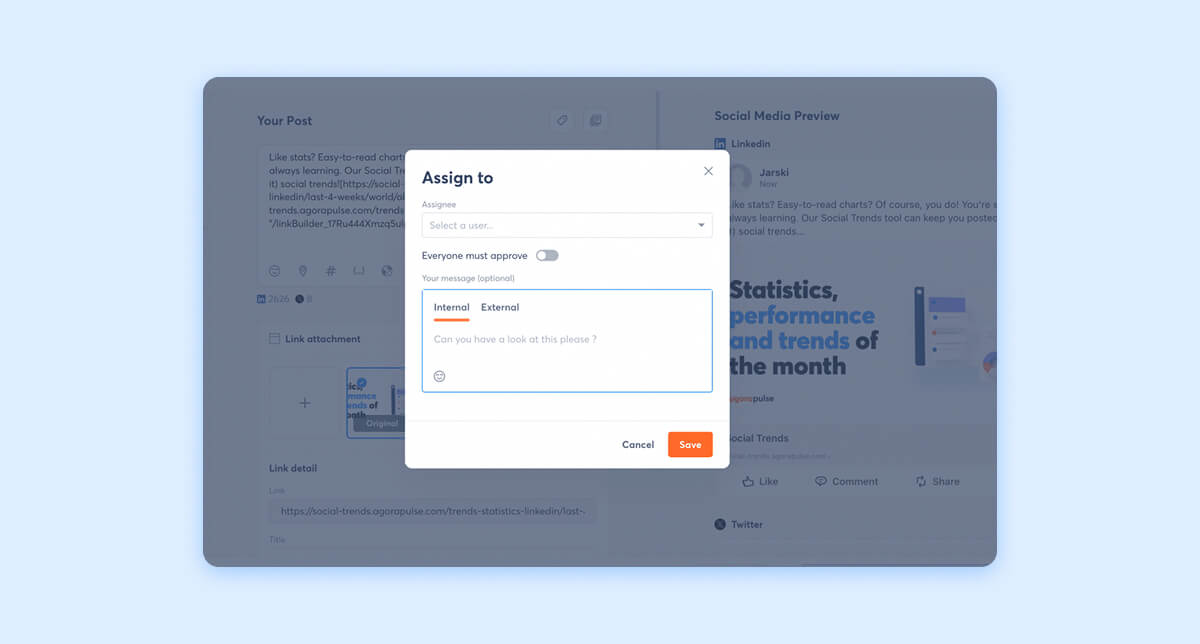
Professional includes post and inbox assignments. Advanced adds shared content calendars. Custom includes custom roles and multi-step approval workflows.
Pricing
Standard is $79 per user/month, Professional is $119, and Advanced is $149, all billed annually. With Custom being tailored. Agorapulse also offers a free plan and a free trial.
Limitations
Multi-step approval workflows are only available on Custom, so teams that need advanced governance on a standard plan may find it limiting.
How To Choose the Right Social Media Collaboration Software for Your Team
Choosing the right social media collaboration platform comes down to how your team works. From structure and workflow to budget and goals, the best tools are the ones that fit naturally into your process and are easy to use. When that alignment is there, execution becomes smoother, communication stays clear, and results follow.
For in-house social teams
Best fit tools: Loomly, Planable, Buffer
In-house teams typically require speed and clarity first and foremost. When content needs approval from multiple stakeholders, even small hiccups can create major delays. The right tool in this case should cut down on back-and-forth, centralize communication, and provide full visibility into what’s ready to go, what’s pending, and what needs feedback.
For multi-brand or enterprise teams
Best fit tools: Dash Social, Sprout Social, Hootsuite
As teams scale across brands, regions, or departments, governance becomes non-negotiable. Enterprise teams thrive when there’s structured permissions, role-based approvals, and workflows in place that keep everything organized without creating any friction. A powerful system facilitates consistency across brands without interrupting momentum.
For content-heavy video teams
Best fit tools: Dash Social, Planable, Loomly
Teams producing high levels of content-heavy videos require much beyond the basic scheduling features. They need platforms that provide predictive insights to support creative decisions, benchmarking capabilities, and campaign coordination across multiple stakeholders. The best software for collaborative social media video campaigns makes it easy to review, approve, and refine content without losing sight of context or slowing down production.
For teams replacing spreadsheets and disconnected tools
Best fit tools: Dash Social, SocialPilot, Sendible
When teams rely on fragmented workflows, like manually reporting in spreadsheets and juggling multiple platforms, the top priority becomes consolidation. A unified platform that brings planning, approvals, publishing, and reporting into one place makes it easier to connect social performance to ROI, so teams can double down on what’s working and eliminate what isn’t.
Why Approval Workflows Matter More As Teams Scale
As social teams grow, approvals get more complex. More stakeholders means more feedback, more revisions, and more chances for delays.
Strong approval workflows help teams:
- Keep feedback in one place instead of scattered across Slack, email, and documents.
- Track what’s pending, what’s approved, and what still needs changes.
- Reduce version confusion by keeping drafts, comments, and final content connected.
- Maintain brand consistency across teams, channels, and campaigns.
- Move faster without giving up control over what gets published.
- Respond to trends while content is still timely.
- Prevent missed handoffs, unclear ownership, and last-minute delays.
Manual approvals create friction, especially when timing matters. A centralized workflow gives teams the structure they need to review, approve, and publish content with more speed and confidence.
Social Media Collaboration Tools FAQs
Which platforms allow team-based content scheduling approvals?
Platforms like Dash Social, Sprout Social, Hootsuite, and Planable are best for supporting team-based approvals. These tools allow teams to assign rules, review content before publishing, and enable approvals of posts in a structured and timely manner.
Which tools offer approval workflows for social media content?
Many social media management platforms allow team-based approvals, including Dash Social, Loomly, Sendible, and Iconosquare. These tools allow teams to assign roles, review content before it goes live, and approve content in a more organized and unified workflow.
What is the best software for collaborative social media video campaigns?
The best software for collaborative social media video campaigns is one that supports creative review, version control, and performance insights all in one workspace. Dash social combines collaboration workflows with clear video performance data, helping teams refine content based on what actually drives engagement. It also uses proprietary predictive AI to improve content decisions and performance outcomes.
What should I look for in a social media collaboration platform?
Teams should look for a user-friendly social media collaboration platform that centralizes planning, approvals, publishing, reporting, and creator management all in one workspace. Some key features that should be prioritized include approval workflows, shared content calendars, asset management, performance insights, and clear reporting. The main goal to keep in mind when choosing a platform is to reduce manual effort and provide teams with clear visibility into both execution and results, leaving less room for error and more room for improvement.
Do enterprise teams need different social media collaboration software?
Yes, enterprise teams tend to require more robust features such as governance controls, role-based permissions, multi-brand support, and scalable workflows. These functions are essential to efficiency across broader teams while enabling control over content and approvals.